

Where we left off after yesterday
Yesterday’s live session opened with a diagram from a 2015 Google paper called ‘Hidden Technical Debt in Machine Learning Systems’. That paper made an argument that changed how teams build with AI: writing the model is the fast, cheap part. Running it inside a company, and keeping it working over time, is where the cost and the risk sit. By the authors’ own estimates, a mature AI system is around 5% model and 95% that surrounding infrastructure.
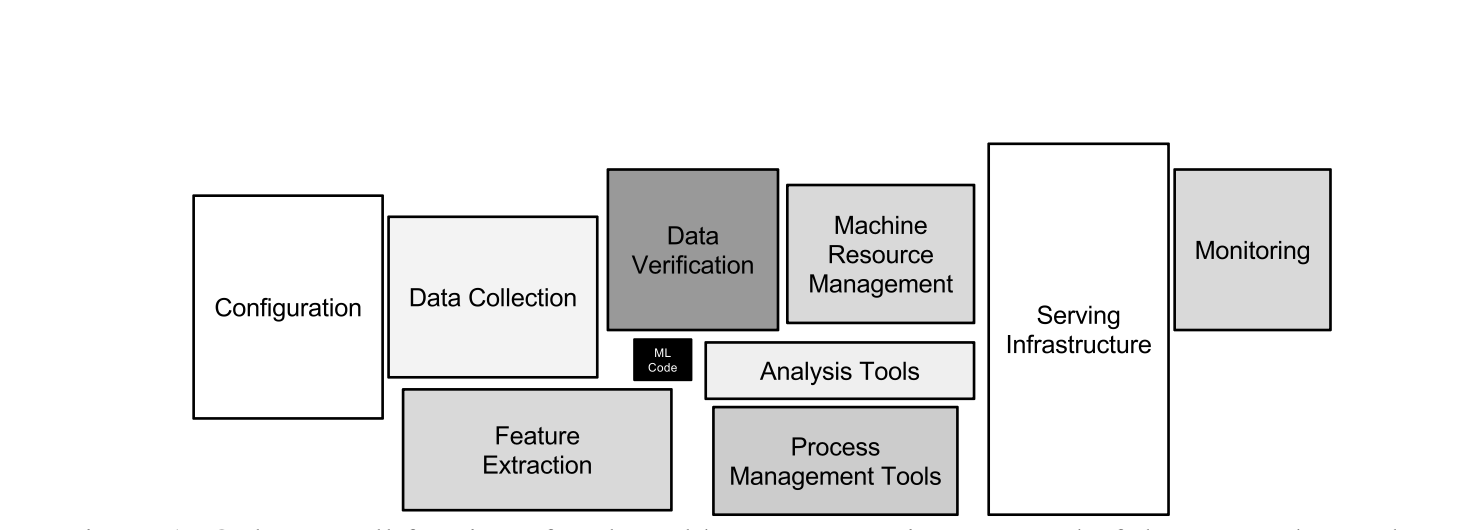
That 95% is where AI projects fail, and it’s what you get asked to approve as a leader, even though it’s the hardest piece for a non-technical person to assess. So on the live, I gave you a way to break any AI project into five layers, and for each layer, the one question that tells you whether it’s a good investment or a risk. Together, the five answers show you where a project is strong and where it will cause trouble, before you commit budget or scale it. Those five layers are model, compute, data, orchestration, and governance. Work through them in order, and you can sit in a leadership meeting and say, with evidence, which layer is ready and which one needs work before the company invests further.
If you missed it, watch the recording here. It includes a link to the deck and the Google paper. This article picks up where that session ended.
What you’re building today
On the live, you learned how to read an AI project across the five layers. Today you turn that into something you own. You’ll build a Claude Project that takes about 30 minutes of notes from a working session with your team and returns a leadership-ready assessment that shows where the project is solid, where it’s exposed, and what to resolve before you scale. Build it once, and you reuse it on every AI project after this, without relearning the framework or writing the assessment yourself.
Below this line is the full build. You get the questions to work through for each layer, the scoring system that shows where the project is solid and where it’s exposed, the instructions you paste into Claude to set the tool up in 10 minutes, and a worked example that turns one messy set of notes into an assessment you could put in front of your CEO that same afternoon.