


A decision framework and three reusable workflows
I don’t use ChatGPT for my data work. For public datasets and personal projects, like the examples in this article, I use DeepSeek.com. It has a 1 million token context window, it’s free, and it supports complex reasoning without losing track during a multi-table join.
When I’m working with sensitive data (which is often the case for my work), I run DeepSeek models locally using Ollama + Continue.dev. The local versions support 128k tokens. 128k tokens sounds abstract, but in practice, it means I can paste the entire schema of a 50-table data warehouse and still have room to ask follow-up questions. I’ve never hit the limit during normal analysis.
This article gives you a decision framework for when to use DeepSeek and when to code manually, a quality control checklist for catching AI mistakes before they cost you hours, and reusable workflow patterns you can adapt to your own analysis tasks. You’ll walk away knowing exactly when to delegate work to an LLM and when to just type the damn code yourself.
Why DeepSeek? And Addressing Privacy Concerns
There are two camps. One group won’t touch DeepSeek because of data residency concerns. The other is excited about publicly available models that match or beat proprietary options on reasoning benchmarks. I’m in the latter camp for my work, unless a client I’m contracting with already has an enterprise account with OpenAI or Anthropic that they prefer I use (which happens most of the time).
My position is that DeepSeek.com is fine for public datasets and the kind of examples I’m sharing here. For sensitive work, the local setup I mentioned earlier is straightforward: install Ollama, pull the DeepSeek model, and point Continue.dev at your local instance. You get the reasoning power without sending anything to external servers.
This isn’t a setup guide, so I won’t walk through every step. The point is that local deployment is viable if privacy is important to your use case. For everything else, the web interface works perfectly well.
Decision Framework: When to Use DeepSeek vs. Coding Manually
DeepSeek handles tasks that require understanding context, reasoning through approaches, or generating code you’d need to look up anyway. You should code manually when the task is faster to type than to prompt, when you’re learning something new, or when you need absolute certainty.
Here’s how I decide:
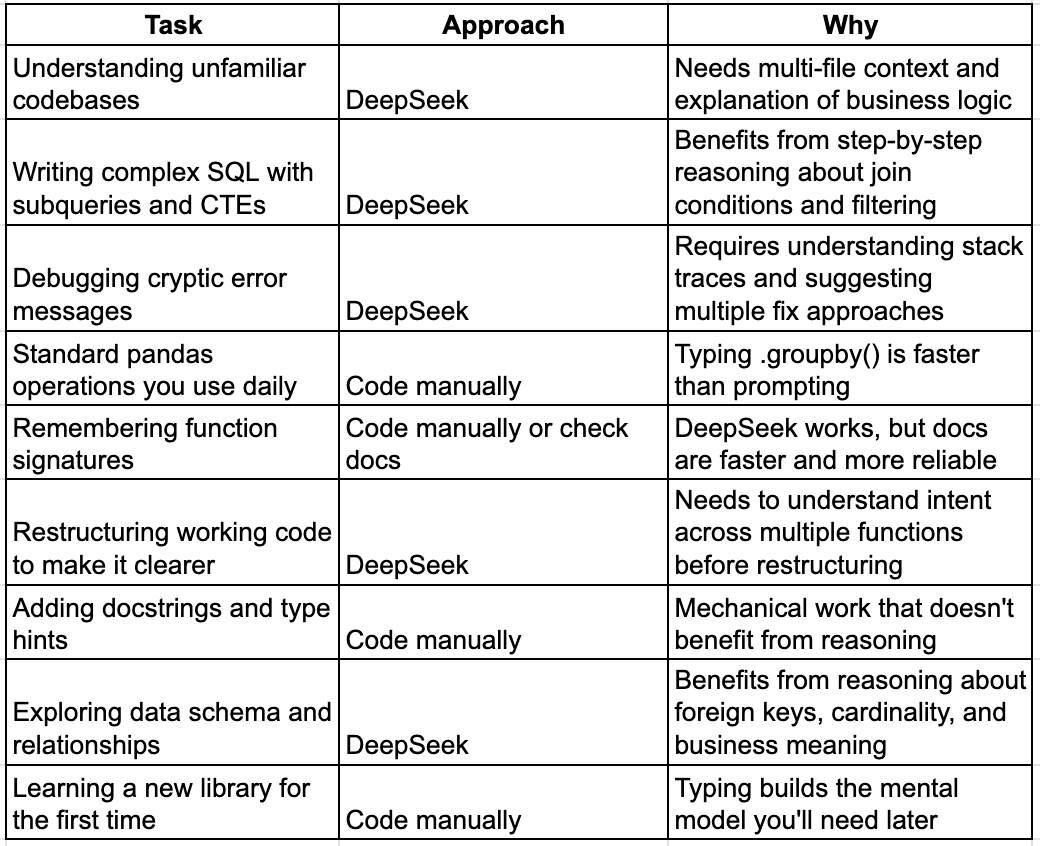
If the task requires understanding why something works or what approach to take, use DeepSeek. If you already know what to write, just type it.
Here’s how that plays out across three common scenarios: