

You can let your team use AI every day without your private data leaking out through it. You do it by deciding, in advance, which kinds of company data are allowed to go to which AI tool, and then setting your tools up to obey that.
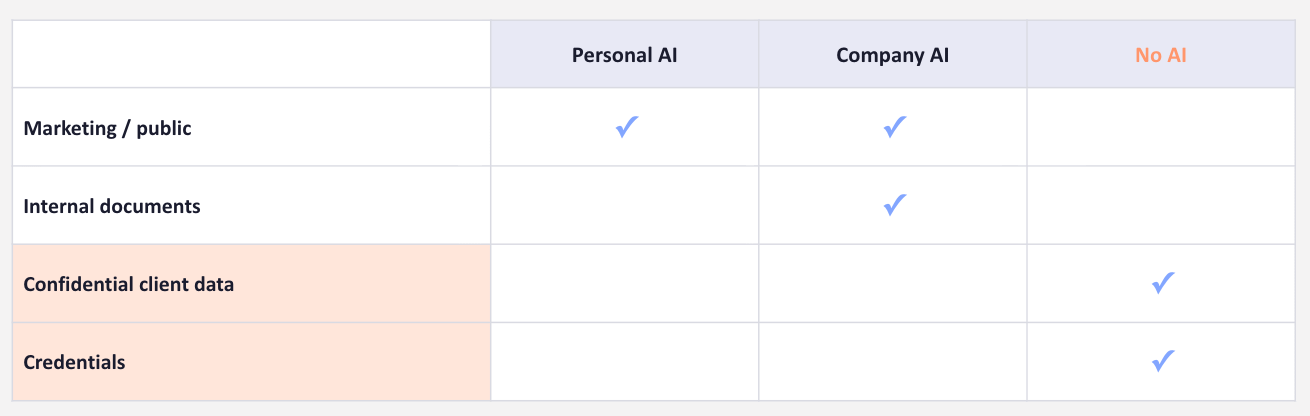
That decision fits on one page. I call it an Exit Map. Down one side you list the kinds of data your company works with. Across the top, where each kind is allowed to go, whether that’s a personal AI account, your company’s approved account, or no AI at all. Public marketing can go anywhere. Internal documents go only to the company account. Send confidential client data and credentials to no AI at all.
I went through this live yesterday. You can watch the full episode here.
Deciding is the easy part. The hard part is making your tools obey that decision. The settings that do it are inside each platform’s admin area, and few teams switch them on.
Do this and your team keeps the AI they want, your confidential data stays in-house, and when your annual review comes you can show which kinds of data your team may send to an AI tool, and which never go near one. Below, I walk you through that setup for both Claude and ChatGPT, one row of your Exit Map at a time. Upgrade to get every step. By the end, your team’s AI tools will be locked down so your private data can’t slip out, and you’ll have the records to prove it if you’re audited.